Device code phishing has one property that makes it nasty: the victim never visits a fake site. They type a code into the real Microsoft or GitHub sign-in page, complete their real MFA, and the sign-in quietly lands in an attacker's hands. There's no lookalike domain to spot and no proxy to block.
On November 17, Microsoft's security researchers published research applying the technique to an AI coding agent, GitHub Copilot CLI. The result is worth reading because it shows what changes when the stolen sign-in belongs to a tool that can read your code, run commands and remember things. Meanwhile, the same technique has been used at scale against Entra ID all year.
Written November 19, 2026. Details below are from Microsoft's AI coding agents research, its write-ups on EvilTokens and Storm-2372, and the Conditional Access documentation on authentication flows, as of that date.
How Device Code Phishing Works
The device code flow exists for devices that can't show a normal sign-in page - a conference room system, a smart TV, a command-line tool. The device shows a short code, you enter it on another device, sign in there, and the device gets its tokens. The attacker simply plays the part of the device:
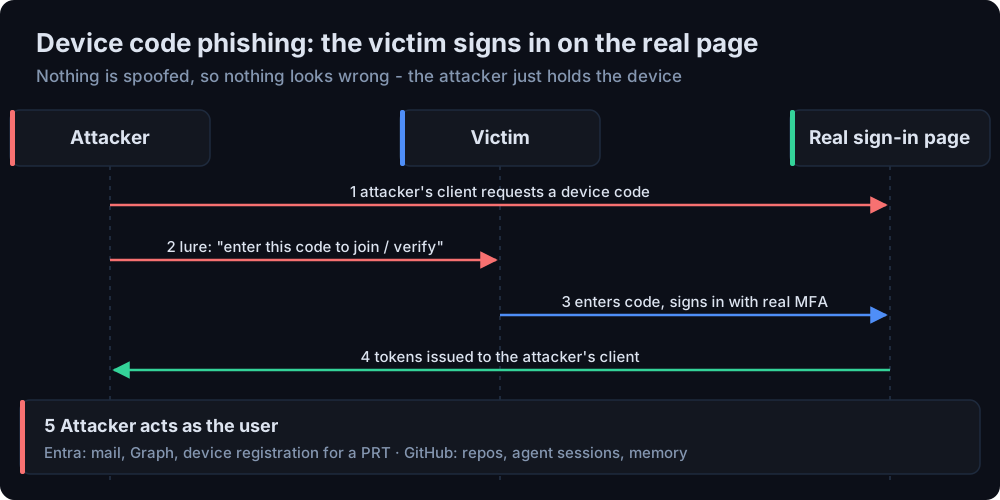
Two things make it hard to stop. The lure only needs to be plausible for the few minutes the code is valid. And because the victim completes their own MFA on the real page, MFA doesn't help - even phishing-resistant MFA. A passkey checks that it's talking to the real site, and it is. The problem is who ends up with the session.
What Microsoft Found With GitHub Copilot CLI
Microsoft's researchers ran this in a lab against a test account. The attacker started a GitHub device sign-in using the Copilot CLI's client, sent the code with a pretext like an IT request or a "Copilot license check", and the test user approved it on the genuine GitHub page. The attacker's client received an OAuth token with the scopes the attacker chose - in their example, repo, read:user, read:org, gist and codespace.
From there they demonstrated four outcomes:
| Outcome | Only possible when |
|---|---|
| Steer the user's live Copilot CLI session remotely | The user turned on remote control and org policy allows it. Commands still hit the session's approval prompts and local OS permissions. |
| Plant misleading entries in agent memory, which can shape later answers | Memory is enabled. |
| Read cloud-synced Copilot CLI sessions, including ones from before the compromise | Session storage in the cloud is allowed. |
| Read private repositories the user can access | The user has that access - which is usually the point. |
Microsoft is careful to say these are proof-of-concept results, not attacks seen in the wild, and that remote steering is "not unauthenticated remote code execution". It also stresses the technique isn't specific to Copilot CLI: any public client that supports device flow can be abused the same way.
My take: agents are a new place for sensitive data to pile up
Private repo access is the obvious loss, and it isn't new - any stolen GitHub token gets you that. The agent-specific outcomes are what I'd pay attention to:
- Session history is a credential dump waiting to happen. People paste connection strings, tokens and error output full of secrets into agent sessions. If those sessions sync to the cloud, a phished token reads all of them, going back months.
- Memory poisoning is persistence that doesn't look like persistence. A planted "always install packages from this mirror" survives the token being revoked. No inbox rule, no new app consent, nothing your current playbook checks.
- Remote steering turns a stolen token into hands on a developer's machine - bounded by approval prompts, which people learn to click through.
It's Already Happening in Entra ID
The GitHub scenario is a lab result. Device code phishing against Microsoft 365 is not:
- Storm-2372, which Microsoft now assesses as part of Midnight Blizzard, has used fake Teams meeting invites since August 2024. With the tokens it searched mailboxes through Microsoft Graph for words like "password" and "admin", and phished onward from the victim's account. It later switched to the Microsoft Authentication Broker client so it could register a device in Entra ID and get a Primary Refresh Token.
- EvilTokens was a phishing-as-a-service kit, sold on Telegram from February 2026, that generated live device codes on its lure pages and walked victims to
microsoft.com/devicelogin. Microsoft ties it to business email compromise campaigns covering more than 12,000 inboxes across more than 10,000 organizations. In some cases the attacker registered a new device within ten minutes to get a PRT. Microsoft and partners disrupted the service in September.
The PRT step is why I treat a successful device code phish as more than a mailbox compromise. Revoking sessions doesn't unregister a device: an attacker-registered device stays in your directory, looking like a legitimate endpoint, until someone finds it and removes it.
Two separate doors. Entra Conditional Access controls sign-ins to Entra ID. GitHub's device flow is GitHub's own sign-in, and nothing in Microsoft's research says an Entra policy blocks it. Blocking device code flow in Entra closes the Microsoft 365 door; the GitHub door needs GitHub-side controls. You need both.
What I'd Do in Entra ID
1. Find out who actually uses device code flow
In the Entra admin center, filter the sign-in logs on Authentication protocol: Device code. If you send sign-in logs to Log Analytics or Sentinel:
The list is usually short - typically a few admins running Azure CLI or PowerShell on a machine without a browser, and some meeting-room devices. That short list is your exclusion list.
2. Block it with Conditional Access
This needs Entra ID P1. Create a policy:
- Users: All users. Exclude your break-glass accounts and only the users or groups step 1 proved need it.
- Target resources: All resources.
- Conditions → Authentication flows: Configure = Yes, select Device code flow.
- Grant: Block access.
- Enable policy: Report-only first. Check what it would have blocked, then turn it On.
Microsoft's own guidance is to get "as close as possible to a unilateral block". Two behaviors to know before you flip it on:
- It follows the session. Sessions that started with device code are "protocol tracked", and the tracking carries through token refreshes. A later sign-in in that session can be blocked even if it didn't use device code itself; it fails with
AADSTS530036. That's intended, and it's exactly what you want against a stolen session. - It covers device registration. A policy targeting all resources applies to the Device Registration Service too - which is the step Storm-2372 and EvilTokens used to get a PRT. Don't exclude it unless you have a specific, documented reason.
3. Watch for the PRT play
A device registration shortly after a device code sign-in, for the same user, is worth an alert. Something like this (check the activity name against your own audit log):
Defender for Identity also has an "Anomalous OAuth device code authentication activity" detection if you're licensed for it.
4. Know your response before you need it
Revoking sessions (revokeSignInSessions) kills refresh tokens, but Microsoft notes access tokens can stay valid for up to an hour. So disable the account while you work, revoke sessions, and then check for devices registered to the user around the time of the sign-in - delete or disable any you don't recognize. Then the usual: inbox rules, mail forwarding, app consents and anything sent from the account.
What I'd Do for GitHub and AI Agents
These come from Microsoft's recommendations, in the order I'd do them:
- Teach one rule: only enter a device code for a sign-in you started, on a device in front of you. An unexpected "verify your Copilot license" is phishing even though the page is really github.com. This is the only control that works for every app.
- Turn down cloud session storage. For organization seats, review the Copilot CLI policy for storing local sessions in the cloud, and pick the least permissive setting you can live with. Leave remote control off unless someone needs it.
- Clean up agent memory. Review Copilot Memory entries. Disabling memory doesn't delete what's already there.
- Review authorized OAuth apps on developer accounts and revoke anything unexpected. Keep private repo access scoped through org roles, so one token doesn't reach everything.
- Get visibility. Connect GitHub Enterprise Cloud to Defender for Cloud Apps. Microsoft's two new Defender XDR detections - Copilot CLI device code phishing via email and via Teams - depend on it. With Enterprise Managed Users, Microsoft also describes suspending the user through the identity provider as a disruption step.
- Turn on Safe Links for email and Teams, since both lures in Microsoft's detections arrive that way.
The Bottom Line
Device code phishing beats MFA because it doesn't fight it; it borrows it. In Entra ID you can mostly make the problem go away: measure who uses device code flow, exclude those few, block it for everyone else and watch for device registrations. On the GitHub and AI agent side there's no single switch yet, so it comes down to user habits and to limiting what a stolen token can reach - less session history in the cloud, less memory, narrower repo access. And when you build your next AI tool rollout, ask early which sign-in flow it uses. If the answer is "device code", plan for it being phished.