If you installed the November 10, 2026 Windows updates, every Windows client in your environment now asks for NTLM message signing by default. Nothing breaks yet: servers still accept clients that don't sign. That changes in May 2027, when Windows servers start requiring signing and turning unsigned clients away.
That gives you about six months to find whatever in your environment still does unsigned NTLM. On top of that, the October updates already changed NTLMv1 behavior and brought better NTLM auditing to older servers, so this is a good moment to look at the whole NTLM picture. Here's what changed, what it does and doesn't protect against, and what I'd do now.
Written November 19, 2026. Details below are from Microsoft's NTLM signing article (KB5135557), the NTLM auditing overview, the NTLMv1 article (KB5066470) and the Retiring NTLM FAQ as of that date. Check them for anything that has changed since.
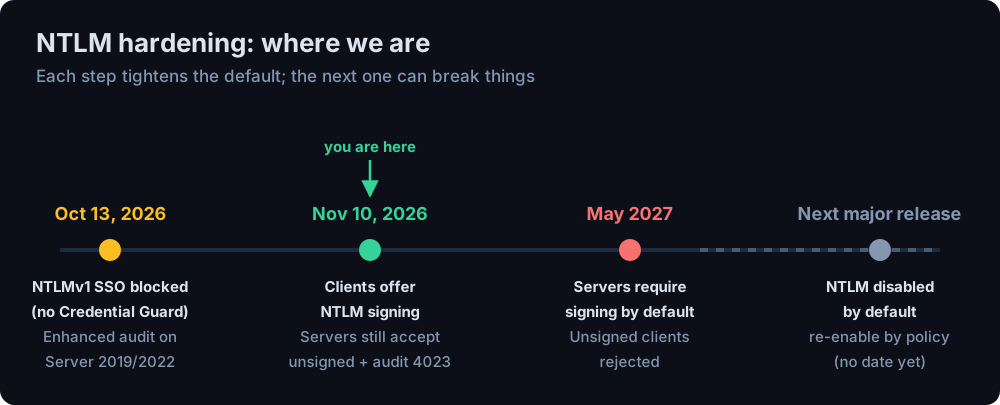
What Changed on November 10
Microsoft is rolling NTLM signing out in two phases:
| When | Clients | Servers |
|---|---|---|
| Phase 1 - November 10, 2026 | Offer NTLM signing on non-anonymous connections by default. | Accept both signed and unsigned clients. Log an audit event for clients that don't sign. |
| Phase 2 - May 2027 | No change. | Require NTLM signing by default. Clients that don't offer it are rejected with SEC_E_UNSUPPORTED_FUNCTION (0x80090302). |
The update applies to Windows 11 (23H2 through 26H2), Windows 10 Enterprise LTSC 2021, and Windows Server 2016, 2019, 2022 and 2025. Microsoft doesn't give a day for Phase 2, only the month.
A few details that matter:
- Anonymous and guest connections are exempt in both phases. Anonymous sessions have no session key to sign with, and guest sessions carry no meaningful privilege.
- Kerberos is untouched. This only changes NTLM.
- Old servers don't break. If a server doesn't echo the signing flag back, the client quietly falls back to the old behavior instead of failing. Microsoft says all Windows servers echo it by default, so in practice this is about non-Windows servers.
- It ships with a critical fix. Microsoft lists the change against CVE-2026-118737, a Remote Procedure Call Runtime remote code execution vulnerability (CVSS 8.1, rated Critical). MSRC lists it as not exploited and not publicly disclosed, with exploitation "less likely" because the attacker has to win a race condition. Either way, the November update is one to install promptly.
What "Signing" Actually Changes
NTLM has always had a signing flag. The problem is that many applications never asked for it, and when they didn't, Windows negotiated a legacy ALWAYS_SIGN flag instead. Despite the name, that's a placeholder: a 16-byte block of zeros, not a signature. The session looked signed on paper and wasn't protected at all.
From November, Windows clients set the real NEGOTIATE_SIGN flag, so the session gets an HMAC-MD5 signature keyed from the session key. That matters because of how NTLM relay works. A relaying attacker sits in the middle, forwards a victim's authentication to another server and rides the resulting session. They never learn the victim's password or session key. Once the target server insists on signed messages, the attacker can authenticate but can't produce valid signatures, so the relayed session is useless to them.
What signing doesn't fix
- Pass-the-hash still works. An attacker who holds the NT hash can work out the session key and sign perfectly well. Signing is a defense against relay, not against stolen hashes - I covered those in Pass-the-Hash in 2026.
- Captured responses can still be cracked. A Net-NTLMv2 response poisoned out of LLMNR or coerced from a server is still crackable offline if the password is weak.
- Your other relay controls still matter. Microsoft's articles don't describe this change as replacing SMB signing, LDAP signing and channel binding, or Extended Protection for Authentication on web services like AD CS web enrollment. Until Microsoft says otherwise, I'd keep all of them in place.
October's Changes You May Have Missed
NTLMv1 single sign-on is now blocked
Since the October 13, 2026 updates, Windows 11 24H2 and later and Windows Server 2025 block single sign-on with NTLMv1-derived credentials by default. This only applies to devices without Credential Guard. The setting behind it is BlockNtlmv1SSO: before October, an unset value meant audit; now it means enforce.
The usual casualty is Wi-Fi, wired 802.1X or VPN using MS-CHAPv2 (PEAP-MSCHAPv2, EAP-MSCHAPv2). Users who type their credentials in still get on; the automatic sign-in is what fails. Look for event 4025 (blocked) in the NTLM Operational log, or 4024 if you've set the value back to audit. Setting BlockNtlmv1SSO to 0 is Microsoft's temporary exception. The real fix is moving those networks to certificate-based EAP-TLS.
Enhanced NTLM auditing now reaches Server 2019 and 2022
The enhanced NTLM events - who used NTLM, from where, to which server, and why it fell back from Kerberos - used to need Windows 11 24H2 or Server 2025. The October 13 updates bring them to Server 2019 and 2022, which is where most domain controllers and file servers I see actually live.
A DC LDAP change broke some NetApp shares
Not NTLM signing, but worth knowing about if your October patching caused grief. October's domain controller update changed LDAP authentication, and NetApp ONTAP and Azure NetApp Files configurations using LDAP session security "none" started failing with "Invalid credentials". Microsoft has a temporary registry mitigation while NetApp works on a fix.
What I'd Do Now
1. Patch, then turn on enhanced NTLM auditing everywhere
Install the November updates. Then make sure the enhanced events are being written on clients, member servers and domain controllers. In Group Policy:
- Clients and servers: Administrative Templates → System → NTLM → NTLM Enhanced Logging
- Domain controllers: Administrative Templates → System → Netlogon → Log Enhanced Domain-wide NTLM Logs
The events land in Applications and Services Logs → Microsoft → Windows → NTLM → Operational:
| Event IDs | Where | What it shows |
|---|---|---|
| 4020 / 4021 | Clients | Outgoing NTLM |
| 4022 / 4023 | Servers | Incoming NTLM, including the negotiated flags and whether the client signed |
| 4030-4033 | Domain controllers | NTLM pass-through, same-domain and cross-domain |
| 4024 / 4025 | Clients | NTLMv1 SSO audited / blocked |
Forward the NTLM Operational log to your SIEM. A single server's log only shows that server; you want the whole environment in one place.
2. Find the clients that don't sign
On servers, the 4023 event records the client's negotiated flags. A client that's ready for May has the signing bit (0x10) and the key-exchange bit (0x40000000) set, and a session key present. One trap: the "ready" and "needs attention" events are both logged as warnings, so filtering on level tells you nothing. Check the flags instead:
Microsoft's KB has its own version of this check. Whichever you use, run it on your busiest servers and your domain controllers. What you're likely to find: printers and scanners doing scan-to-folder, NAS appliances, older Linux and Samba clients, embedded devices, and line-of-business apps that call NTLM directly. Each one needs a firmware update, a configuration change or a vendor conversation before May.
3. Enforce early where it's clean
You don't have to wait for May. Once a server's audit events show nothing unsigned for a few weeks, enforce on it now:
No restart is needed. Domain controllers are the relay target attackers want most, so audit them first. They'll probably be the last to come up clean, though, because everything talks to them. In the meantime, enforce on any server that's already clean - often more of your estate than you'd expect - and work the DCs' list down until they can follow. Doing it server by server on your schedule is far better than everything flipping at once in May.
4. Treat the opt-out as a dated exception
ClientAllowUnsignedNtlm=1 (same registry key) stops a client offering signing. Microsoft describes it as temporary compatibility only and says it may remove these registry values in a future release. If you need it for a broken app, scope it to the machines that need it, write down why and who owns the fix, and set a review date. An undocumented opt-out is how "temporary" turns into permanent.
5. Keep shrinking NTLM itself
Signing is a stepping stone. Microsoft's stated target is NTLM disabled by default in the next major Windows Server and client release - still there and re-enabled by policy, but off. In-market versions keep it. The same audit data tells you where to start:
- Missing or duplicate SPNs are the most common reason for falling back to NTLM.
setspn -Xfinds duplicates. - Connections by IP address can't use Kerberos by default. Use DNS names instead.
- Apps that hard-code NTLM should ask for Negotiate, so Kerberos is used whenever it can be.
- Block NTLM for privileged accounts first. Members of Protected Users already can't use it, and they're the accounts you least want relayed or passed.
The Bottom Line
November's change is the gentle half. Clients signing by default closes a gap that's been open for decades, and on its own it breaks nothing. The May 2027 half is the one that breaks things, and it only breaks things you haven't found. Turn on the auditing now, work through the unsigned clients over the winter, and enforce server by server as each one comes up clean. If you do, May is a non-event. If you don't, you'll find your forgotten printers and appliances the hard way, on whatever day the update lands.