Microsoft is retiring the SMS and voice-call authentication it provides natively in Entra ID, and making passkeys the default. Some tenants are already showing this banner on the Authentication methods page:
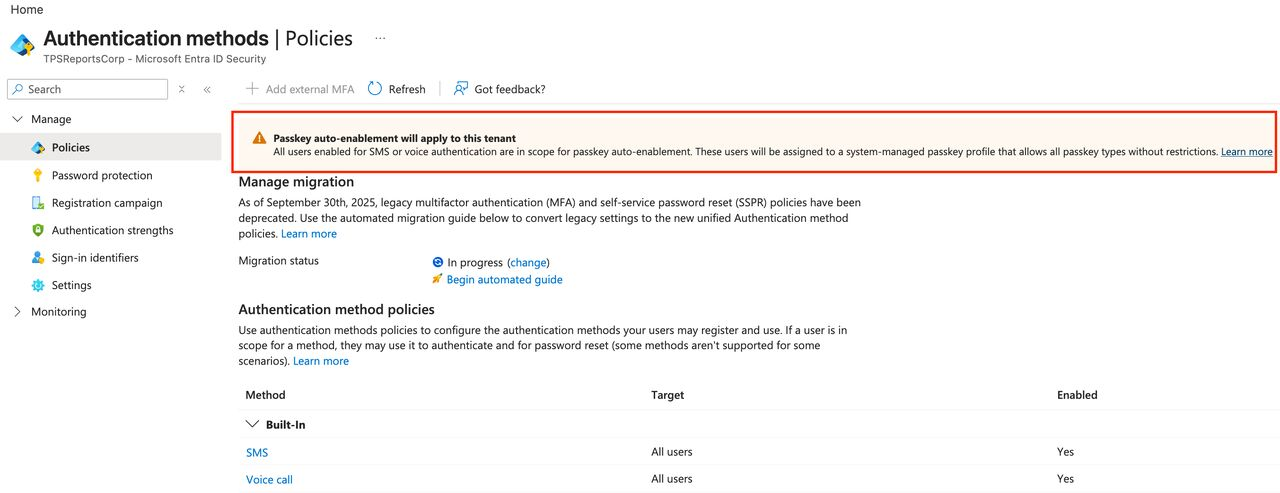
The move away from SMS is the right call - it's one of the weakest MFA methods left in common use. But the way the change rolls out has a few details that will catch tenants out if nobody plans for them. Here's what's changing, and what I'd do about it.
Written October 22, 2026. Dates and details below are from Microsoft's retirement announcement and FAQ as of that date. Check them for anything that has changed since.
What's Changing, and When
| Date | What happens |
|---|---|
| September 1, 2026 | Passkeys become the default. Users enabled for SMS or voice are auto-enabled for passkeys and nudged to register one at MFA sign-in. |
| October 30, 2026 | Tenants that need to keep SMS or voice can start configuring a third-party telephony provider from the Microsoft Security Store. |
| February 1, 2027 | Microsoft-provided SMS and voice authentication is retired for all users except Global Administrators and external users. Internal guests are included in this date. |
| July 1, 2027 | Retired for Global Administrators and external users. |
A few details that matter:
- Phone-based authentication isn't disappearing - Microsoft's free delivery of it is. After the retirement date, SMS and voice only work through a third-party telephony provider (initially Soprano and Telesign, in preview), which you contract and pay for separately. Microsoft positions this for organizations with a regulated or operational need, and says to default everyone else to passkeys.
- It covers self-service password reset too. Microsoft's FAQ is explicit: the retirement "applies across Microsoft Entra, including SSPR." If your users reset passwords with a text message, that stops as well.
- Users whose only method is SMS or voice get blocked. From their retirement date, they must register a passkey during sign-in before they can continue. There's no opt-out from this enforcement.
- There is a temporary opt-out from the auto-enablement (September 1, 2026 to February 1, 2027) through Microsoft Graph. It only delays the automatic setup - it doesn't move the February deadline.
What Auto-Enablement Actually Does
On September 1, every user enabled for SMS or voice - in the Authentication methods policy or in legacy MFA settings - was auto-enabled for passkeys. Two things happen to those users:
- They're placed in a system-managed passkey profile that, in the banner's words, "allows all passkey types without restrictions."
- Your registration campaign is switched to Microsoft-managed and targeted at passkeys, so they're prompted to register one after MFA - with unlimited snoozes by default.
My Take: Where This Will Bite
"All passkey types without restrictions" is a decision you should make, not inherit
That profile allows synced passkeys - passkeys stored in a user's iCloud Keychain, Google Password Manager or similar - and doesn't restrict which authenticators can be used. For most users, that's a big improvement over SMS and a perfectly reasonable default. For privileged accounts, it isn't what I'd choose. An admin's credential that syncs into a personal cloud account is only as well protected as that account. For anyone with administrative access, I'd want device-bound passkeys - a FIDO2 security key, Windows Hello for Business, or a passkey in Microsoft Authenticator - and ideally attestation and key restrictions so only approved authenticators are accepted.
Unlimited snoozes mean the work lands on February 1
Users who can snooze a prompt indefinitely will. The likely result: a large group of users who never registered anything else, all hitting a blocking registration prompt on the first working day after February 1, 2027 - and calling the helpdesk. If you want an orderly migration, you need to drive it before then, not let the nudge do it.
Legacy settings can quietly keep SMS on
Microsoft deprecated the legacy MFA and SSPR policies on September 30, 2025, but plenty of tenants - including the one in the screenshot - still show the migration as "In progress." Until it's finished, SMS and voice can stay enabled through the legacy settings even after you've cleaned up the Authentication methods policy.
SMS was never just "weak MFA"
The retirement focuses on SMS as a second factor, but SMS can also be a primary credential: with Use for sign-in enabled on the SMS method, a phone number and a texted code are enough to sign in, with no password. That setting is worth turning off on its own merits, regardless of the retirement.
What I'd Do Now
1. Find out who actually depends on SMS and voice
Start with the users whose only registered method is a phone number - they're the ones who'll be blocked. Microsoft publishes a PowerShell SMS and voice usage analyzer for exactly this. If you have Entra ID P1 or P2, the registration details report gets you there too:
Anyone with IsAdmin set to True on that list goes to the top of the queue.
2. Turn off SMS sign-in
In Authentication methods → Policies → SMS, make sure Use for sign-in is off. This only stops a phone number working as a primary credential; SMS for MFA and password reset is unaffected until the retirement.
3. Scope SMS and voice to the people who need them
Instead of All users, target SMS and voice at a dedicated security group - for example, staff without a company phone who haven't moved to another method yet. As people register passkeys, remove them from the group. It turns the migration into a shrinking list you can measure.
4. Finish the legacy MFA and SSPR migration
If Manage migration still says "In progress", finish it, so the Authentication methods policy is the only place methods are controlled. Otherwise SMS can come back on through the legacy settings.
5. Review the passkey profile before it reviews you
Decide what the default profile should allow for everyone, and create a separate, stricter configuration for privileged users - device-bound passkeys only, with attestation and key restrictions where your authenticators support them.
6. Move privileged accounts to phishing-resistant methods first
SMS, voice and push approvals can all be relayed through an adversary-in-the-middle phishing proxy. Passkeys, FIDO2 security keys and Windows Hello for Business can't. Move admins first, then enforce it with a Conditional Access policy that requires the phishing-resistant MFA authentication strength for administrative roles. Global Administrators technically have until July 2027 - don't use it.
7. Plan the people side
- Communicate early. Microsoft has communication templates for exactly this kind of rollout.
- Have a path for users without a capable device. A Temporary Access Pass lets the helpdesk get someone signed in to register a passkey without falling back to SMS.
- Only buy a telephony provider for a real requirement. It's a recurring cost per message and per region. If the need is "some users haven't migrated yet", the answer is migration, not a carrier contract.
The Bottom Line
Retiring SMS is good news for identity security - text messages were never a strong second factor. But "passkeys by default" isn't the same as "passkeys deployed well." If you let the defaults run, you'll get permissive passkeys for everyone, including your admins, and a helpdesk spike on February 1, 2027. If you use the next few months, you get a planned migration to phishing-resistant authentication, with your privileged accounts done first.
This post expands on my LinkedIn post on the same topic - join the discussion there.