In October 2026, an attacker used a stolen credential for ConnectWise Cloud Backup - the Microsoft 365 backup product formerly known as SkyKick - to sign in to hundreds of customer Microsoft 365 tenants. The incident response rightly focused on the immediate questions: which app IDs to disable, which IPs to search for, what the attacker touched.
I'll cover those below. But working in identity security, the part of this incident I keep coming back to is structural, and it applies to almost every Microsoft 365 tenant, whether it ever used SkyKick or not: a third-party app holding the right Microsoft Graph permissions is Global Administrator in your tenant - and the key to it lives in someone else's environment.
Written October 19, 2026, while the incident was still under investigation. The facts below reflect public reporting at that date, and I've flagged where sources disagreed or something was unconfirmed. Check the ConnectWise Trust Center for later updates. The identity analysis doesn't depend on those details.
What Happened
ConnectWise Cloud Backup - formerly SkyKick, acquired by ConnectWise in 2024 - runs as a multi-tenant Entra ID application. MSPs and customers consent it into their Microsoft 365 tenants so it can back up mail, OneDrive, SharePoint and Teams.
An attacker obtained a credential for that application. Because the credential belongs to the vendor's app registration, it lives in ConnectWise's own Entra tenant - and it works in every tenant where the app was consented. With it, the attacker signed in to customer tenants as the application. No user was involved, so user MFA and user Conditional Access never applied.
The key points, per Huntress, SpecterOps and the ConnectWise Trust Center:
- October 15: the main activity. The Cloud Backup app obtained Microsoft Graph tokens across customer tenants from an attacker IP, working through tenants seconds apart.
- In at least one tenant, a related ConnectWise app ("Cloud Management - MS Teams") added itself to Global Administrator, then added new client secrets, valid until 2028, to two other applications in that tenant - one of them Huntress's own security app.
- Scale: Huntress confirmed unauthorized sign-ins in 162 tenants as of October 16, and later reported almost 1,000 tenants with sign-in activity from the attacker IP, over 300 of them successful. Those are one vendor's telemetry, not a full count - ConnectWise and Microsoft haven't published one.
- ConnectWise says it identified the issue on October 14, published its first advisory on October 16, disabled seven application identities on October 17, and suspended Cloud Backup, SaaS Security and Cloud Management. As of October 19 those services were still offline.
- Microsoft Threat Intelligence called it an "active supply chain attack" and assessed the attacker likely abused permissions customers had granted, likely including
Directory.ReadWrite.All.
At the time of writing, ConnectWise hadn't disclosed how the credential was stolen, and there was no attribution or government advisory. Sources also disagreed on the credential type (Huntress says a client assertion, i.e. certificate-based; some press says a client secret).
Why None of Your Usual Controls Mattered
This is the part that should bother every tenant owner. Walk through the controls most organizations rely on:
- MFA and Conditional Access for users - irrelevant. These were app-only sign-ins.
- Conditional Access for workload identities - Microsoft's documentation states it doesn't cover third-party or multi-tenant apps. You can't IP-restrict a vendor's service principal.
- GDAP - constrains partner users through Partner Center. It does nothing to the Graph permissions of a vendor app consented in your tenant. An MSP can be fully least-privilege on GDAP while its backup tool holds Global Admin-equivalent access.
- Blocking the attacker IPs - the app talks to Microsoft's cloud directly, so your firewall never sees it.
The only things that worked were controls that touch the grant itself: fewer permissions, a disabled app, an alert when an application does something, and logs that were already being kept.
My Analysis: The Permissions Were the Real Exposure
The stolen credential is the obvious story. From an identity standpoint, the more useful question is what made that credential worth stealing - and the answer is the Graph application permissions the app held in every tenant that consented to it.
Graph application permissions (app roles) are a separate authorization system from Entra directory roles. A service principal can be Global Admin-equivalent without holding a single directory role, which means it doesn't show up in your normal role reviews. Microsoft's own permissions reference warns about each of these:
| Application permission | What it allows | BloodHound edge |
|---|---|---|
Application.ReadWrite.All |
Manage all applications and service principals - including adding credentials to them, so the app can act as any other app and use its privileges | AZMGAddSecret, AZMGAddOwner |
AppRoleAssignment.ReadWrite.All |
Grant application permissions to any app - including itself | AZMGGrantAppRoles |
RoleManagement.ReadWrite.Directory |
Assign any Entra directory role - including Global Administrator - to any principal, including itself | AZMGGrantRole |
SpecterOps documented back in 2021 that each of these, on its own, is a path to Global Administrator. Microsoft's own guidance says service principals holding highly privileged access are control-plane - Tier 0 - assets. Yet Entra puts no "privileged" label on these grants, so nothing in the portal flags them.
Here's what that looks like in BloodHound, in my lab tenant: a "vendor backup app" service principal with these permissions. Every edge out of it is a way to reach Global Administrator - directly, by granting itself more permissions, or by adding a secret to another app that already holds the role.
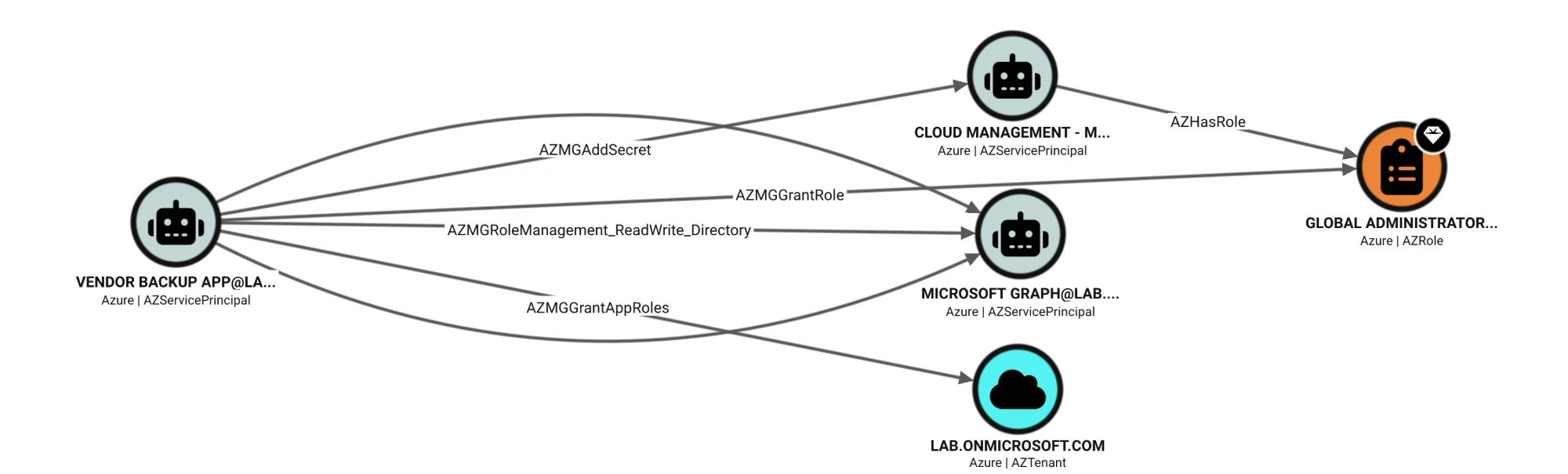
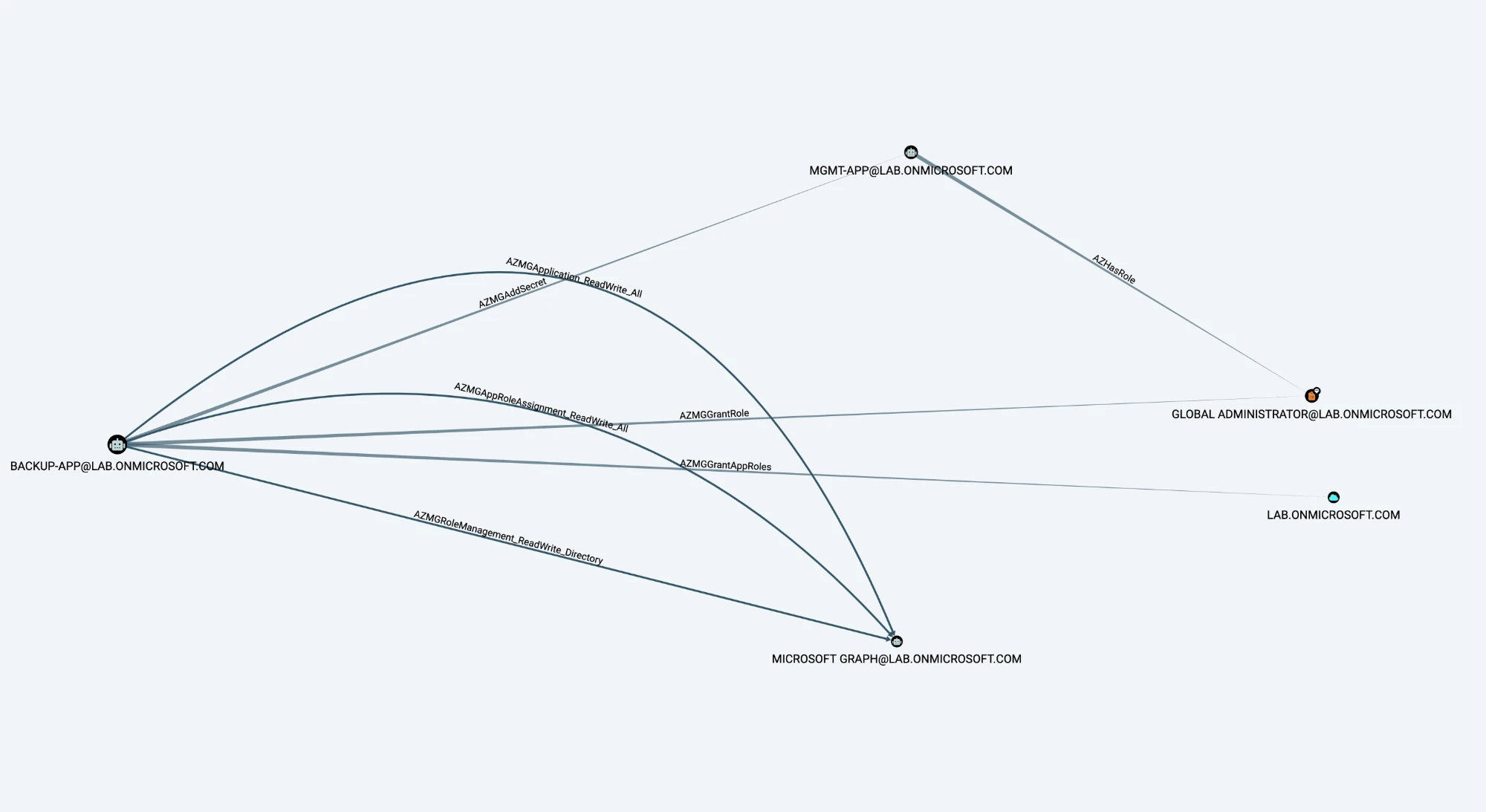
To be precise: no public source lists the exact permissions the ConnectWise apps held. An app making itself Global Administrator and then adding secrets to other apps is consistent with permissions like these, but that's inference. The point isn't this one vendor - it's that most tenants have granted permissions like these to some vendor, and have never looked.
If You Used ConnectWise Cloud Backup or Cloud Management
The published guidance from ConnectWise, Huntress and others converges on these steps:
- Disable, don't delete. Set each ConnectWise/SkyKick enterprise app to "Enabled for users to sign in? = No". Deleting destroys evidence and forces re-consent later.
- Match on Application ID, not name. Older tenants may show these apps as "SkyKick Cloud Manager".
- Preserve logs now. Entra sign-in and audit logs are kept for only 7 days on the free tier and 30 days on P1/P2. If you're on the free tier and haven't exported them, the October 15 records may already be gone.
- Review service principal sign-ins from October 13 onward. They're on a separate tab in the sign-in logs that the default view hides.
- Hunt for anything an application initiated - role assignments, new credentials, app role assignments, new owners, consent grants (queries below).
- Check every other app for new secrets or certificates. In ConnectWise's own words: "A replacement legitimate credential does not remove an attacker-added credential, role, or consent grant." A secret planted on another app survives every fix the vendor makes.
- Check Exchange for new inbox, forwarding and transport rules.
The application IDs ConnectWise published:
| Application | Application (client) ID |
|---|---|
| ConnectWise Cloud Backup | 506e08f9-6e9a-4da4-942b-a099a03644ae |
| Cloud Management - MS Teams | 24205314-2b89-4e07-a2a4-579e898a5640 |
| Cloud Management - Exchange Online | b78f6a77-d4e5-46fb-87e5-d1648bd02519 |
| Cloud Management - SharePoint Online | b2b55f5b-7758-4719-8d8f-88ae172e6bdb |
| ConnectWise Cloud Management | 2399d300-6fca-4e6a-a686-399fefe75b83 |
| Cloud Management - MS Graph | 0de14c77-b9b0-4137-9360-34878a929827 |
| Cloud Management - Partner Center | 412dcf96-176d-4b3a-a1b0-4981ad66971e |
Attacker IPs reported: 144.172.64[.]128 (primary), 144.172.64[.]99 and 144.172.64[.]60. Use them to search your sign-in logs, not your firewall. Check the ConnectWise Trust Center for the current list - it has been updated several times.
For Every Tenant: Find Your Own "Vendor Backup App"
1. Inventory Third-Party Apps and Their Grants
List every service principal owned by another organization, and flag the dangerous Graph application permissions and any credentials on it. This only reads data:
Two things to look for in the output:
- Any third-party app with one of the risky permissions. Ask whether it really needs it, and treat it as Tier 0 until it doesn't.
- A secret (
LocalSecrets) on a third-party app's service principal. A vendor's legitimate credential lives on the app registration in their tenant, so a secret on its service principal in yours is unusual - and it's exactly what a planted credential looks like. (Certificates are less clear-cut: SAML single sign-on apps legitimately carry signing certificates on the service principal.)
For the full picture - which of these apps can actually reach Global Admin, and how - collect your tenant with AzureHound and look at outbound edges from third-party service principals in BloodHound, as in the screenshots above.
2. Alert When an Application Changes Privileges
Here's the encouraging part: even when the attacker holds the vendor's credential, the changes they make happen in your tenant and land in your audit log. One Reddit admin's PIM alert fired on October 15 - a day before ConnectWise's first advisory.
The highest-fidelity signal for this whole class of incident is an application appearing as the initiator of a privilege change:
Expect some legitimate results - provisioning and management tools do make changes - so baseline it, then alert on anything new. Microsoft rates new credentials on an app, apps assigned to directory roles, and apps granted privileged Graph permissions as high-severity, and has Sentinel templates for each.
3. Shrink the Grants
- Remove what isn't needed. Ask each vendor to justify every Graph application permission. Prefer narrower scopes - for example, Exchange RBAC for applications to limit mailbox access to specific mailboxes.
- Disable dormant apps. Forgotten installs keep their permissions forever. Admin consent is a one-time decision with permanent effect, and nothing prompts you to review it.
- Use app management policies (included in the free tier) to block new client secrets and cap credential lifetimes. That directly targets the "plant a secret on another app" persistence seen here.
- Limit who can add credentials. Application Administrators, Cloud Application Administrators and app owners can all add secrets to apps - treat those roles accordingly.
- Keep user consent tight and route everything else through the admin consent workflow.
4. Ask Your Vendors Harder Questions
Whoever controls the vendor's credential controls your tenant, so the vendor's key management is now your Tier 0 dependency. Add these to your vendor reviews:
- Exactly which Graph permissions do you request, and why each one?
- Is your app credential a certificate held in an HSM, or a client secret? How is it rotated?
- Is the app instance property lock enabled on your app? (It stops anyone adding credentials to your app's service principal in customer tenants. It's on by default for new apps, but only the publisher can set it, and older apps may predate the default.)
- What's your notification commitment if your credential is compromised? Here, the gap between ConnectWise's stated discovery and its first advisory was about two and a half days.
5. Turn On the Logs You'll Wish You Had
- Microsoft Graph activity logs - the only record of what an app read through Graph. The normal audit log doesn't record reads, and Graph activity logs can't be turned on retroactively.
- Export sign-in and audit logs to Log Analytics or your SIEM, so you're not limited to 7 or 30 days.
- Workload Identities Premium adds risk detection for workload identities, which - unlike Conditional Access - does cover multi-tenant apps.
The Bottom Line
Through an identity lens, this isn't really a story about one vendor. Admin consent to a multi-tenant app with these permissions is a standing delegation of control over your tenant to someone else's key management - and MFA, Conditional Access, GDAP and your firewall don't touch it.
So the useful question isn't "were we hit by SkyKick?" It's: which third-party service principals in our tenant can reach Global Admin today - and would we know within an hour if one did?
Sources: Huntress, SpecterOps, ConnectWise Trust Center, Blumira, BleepingComputer, The Hacker News, Cybersecurity Dive, Microsoft Learn on Graph permissions and Conditional Access for workload identities.